
Raze Clicker —
More than just a clicker
A lightweight tool for automating repetitive actions. Two click modes, a customizable hotkey and sequence recording and playback.
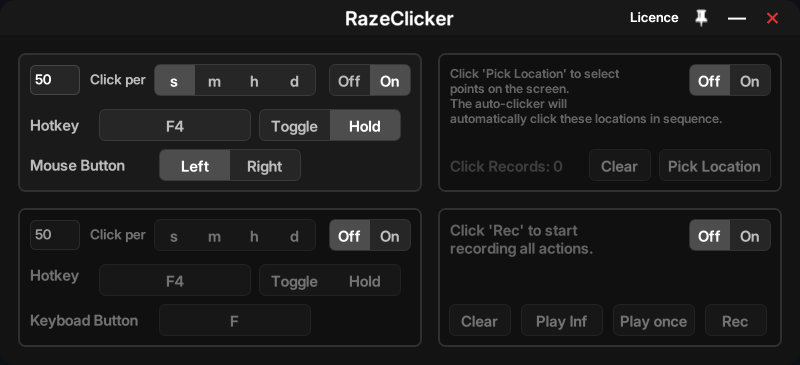
Two click modes
Mouse clicks (left/right button) at specified coordinates or keyboard key presses. Intervals starting from milliseconds.
Customizable hotkey
Remappable hotkey for starting and stopping. Supports Hold (press-and-hold) and Toggle (on/off) modes.
Recording and playback
Manual recording of action sequences, automatic repetition, and clearing recordings.
Why RazeClicker?
| Feature | OP AutoClicker | GS AutoClicker | TinyTask | RazeClicker |
|---|---|---|---|---|
| Single-point clicking | ✅ | ✅ | ❌ | ✅ |
| Multi-point clicking | ❌ | ✅ | ❌ | ✅ |
| Action recording | ❌ | ❌ | ✅ | ✅ |
| Modern interface | ❌ | ❌ | ❌ | ✅ |
| Click precision | ❌ | ❌ | ❌ | ✅ |
How to get started
Launch RazeClicker. Select a mode: mouse clicks or keyboard key press
Set the interval (seconds/minutes/hours/days), the button, and the hotkey.
Use Pick Location to click at specific points or Rec to record actions.